Multi Vehicle Option for e-Way bill
The new option has been introduced wherein the consignment of one e-way bill has to be
moved in multiple vehicles, after moving to transshipment place.
For example, an e-way bill is generated and needs to be moved from A to C. Here, the
consignment moves from A to B via Rail or bigger vehicle. Now, it is not possible to move the
consignment from B to C in the same mode of transportation due to unavailability of that
mode or may be due to hilly region where big vehicles cannot be used. In such cases, the
consignment needs to be moved in multiple smaller vehicles.
Steps:
1. First generate the e-way bill with source and destination as per the document/invoice.
2. Carry out the first leg of movement of the consignment up to the transshipment.
3. Choose the ‘Change to Multi-vehicle’ option and update the e-way bill for multi-vehicle movement. Here, the total quantity of the consignment and movement from and to
place for the multiple vehicles requirement has to be entered
4. Now, when the consignment has been loaded to the smaller vehicle, update the ‘PartB’ of the e-way bill with the vehicle number, along with the quantity loaded, and move the consignment.
5. Step No 4 may be repeated till total quantity is loaded and moved. The system will not
allow the quantity to be shipped in multiple vehicles more than what has been declared while marking the e-way bill for mulit-vehicle.
Detailed Explanation:
Select the ‘Change to Multi Vehicle’ option from the menu and enter e-way bill number to
be changed to multiple vehicles for further movement and the system shows the details for
e-way bill.
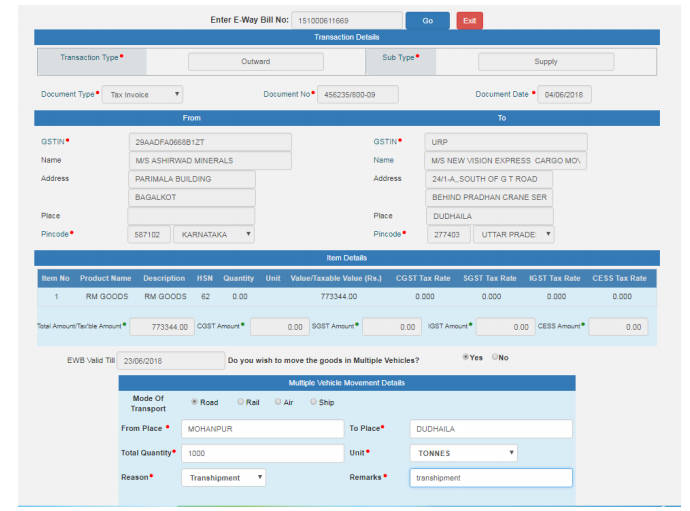
Here, confirm for the multiple vehicles movement and enter the ‘from place’, ‘to place’ ,
quantity of the consignment and reason to go for multi-vehicle. Once it is submitted, the eway
bill is changed to the multi-vehicle movement.
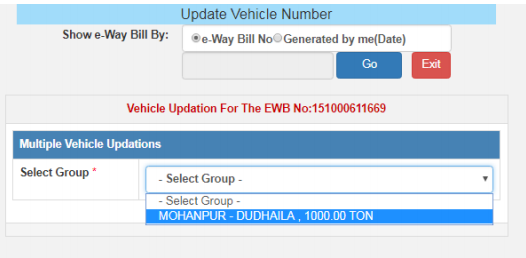
Now, whenever the part of the consignment has to be moved, select Update Vehicle option
and select the group as shown below. The group is from place – to place. If for the
movement, multiple ‘from place – to place’ has been entered, the system shows the details
accordingly.
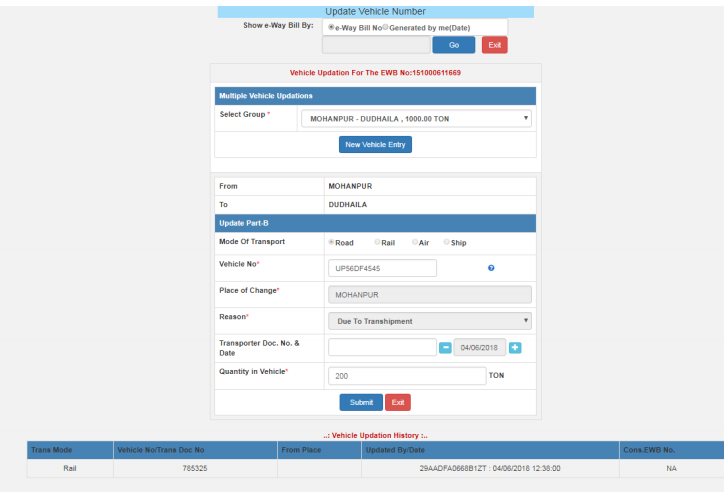
Now, enter the vehicle details as usual along with the quantity being moved and submit.
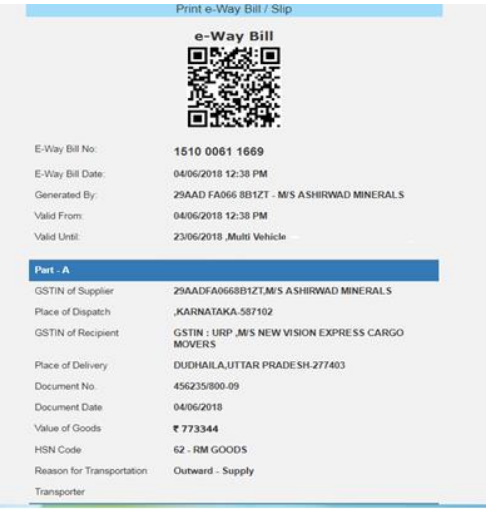
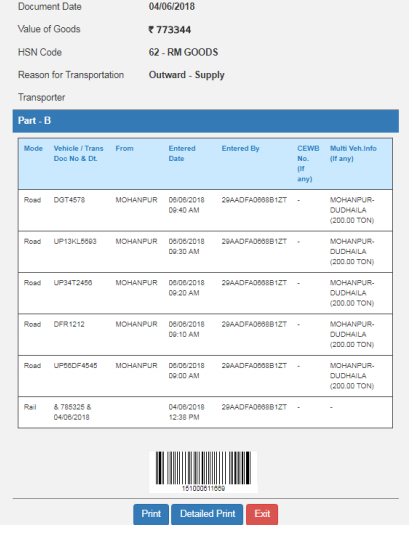
The print of the e-way bill looks like this. Please note the ‘Valid until’ column indicates the
Multi-vehicle and Part-B contains the ‘from place – to place’ along with the quantity is being
moved. This way once can use the facility for split movement of one consignment of one eway
bill.
Free Study Material on Eway Bill System of India
Eway bill login Official website in India
Bill to Ship to under GST and Eway Bill : Analysis
Bill To Ship To issues of Eway Bill Clarified by Govt
Two different dates for Tax Invoice and Eway bill Allowed ?
JSON Upload Error Codes on Eway Bill Portal
E way Bill Preparation tool , e way Bill Json Format : Download
JSON file on E-Way Bill Portal not uploading : solution
Register on E Way Bill Portal even if already registered on GST Portal
Eway Bill for SEZ within state : Important Notice
The post Multi Vehicle Option for e-Way bill appeared first on Tax Heal.
from Tax Heal https://ift.tt/2sO1in6

No comments:
Post a Comment